
YOUR QUESTIONS,
ANSWERED!
QUICK LINKS
REGISTRATION
QUESTIONS
-
Your race entry to our 5K, 5 Mile, Tot Trot, or Virtual run will come with our TROT DSM knit cap, the official finisher ornament at the finish line, official race bib + finish time, access to our GPS tracking app, and a custom made shopper bag to carry it all in.
-
Absolutely. You can change your mind through packet pick-up.
-
The Des Moines Turkey Trot does not issue refunds, deferrals, or allow athletes to transfer registrations. If the event is unable to happen as scheduled due to local, state, or federal mandates, or must be canceled for any other reason, all athletes will be transferred to our virtual event.
-
If your name changes- sure. Otherwise- no, sorry.
-
If you registered and would like to view or edit your registration, see the list of items you can manage on your Run Signup profile below :
View Registration Information
Resend Confirmation Email
Sign Waiver
Transfer to Another Event : switch to virtual or vice versa
Update Add-ons : shirt color, add socks, etc.
If you are unable to update a part of your registration, that part may be disabled to update or the deadline has passed. Please contact the race team before race week at info@riproarevents.com for questions.
Click here for instructions.
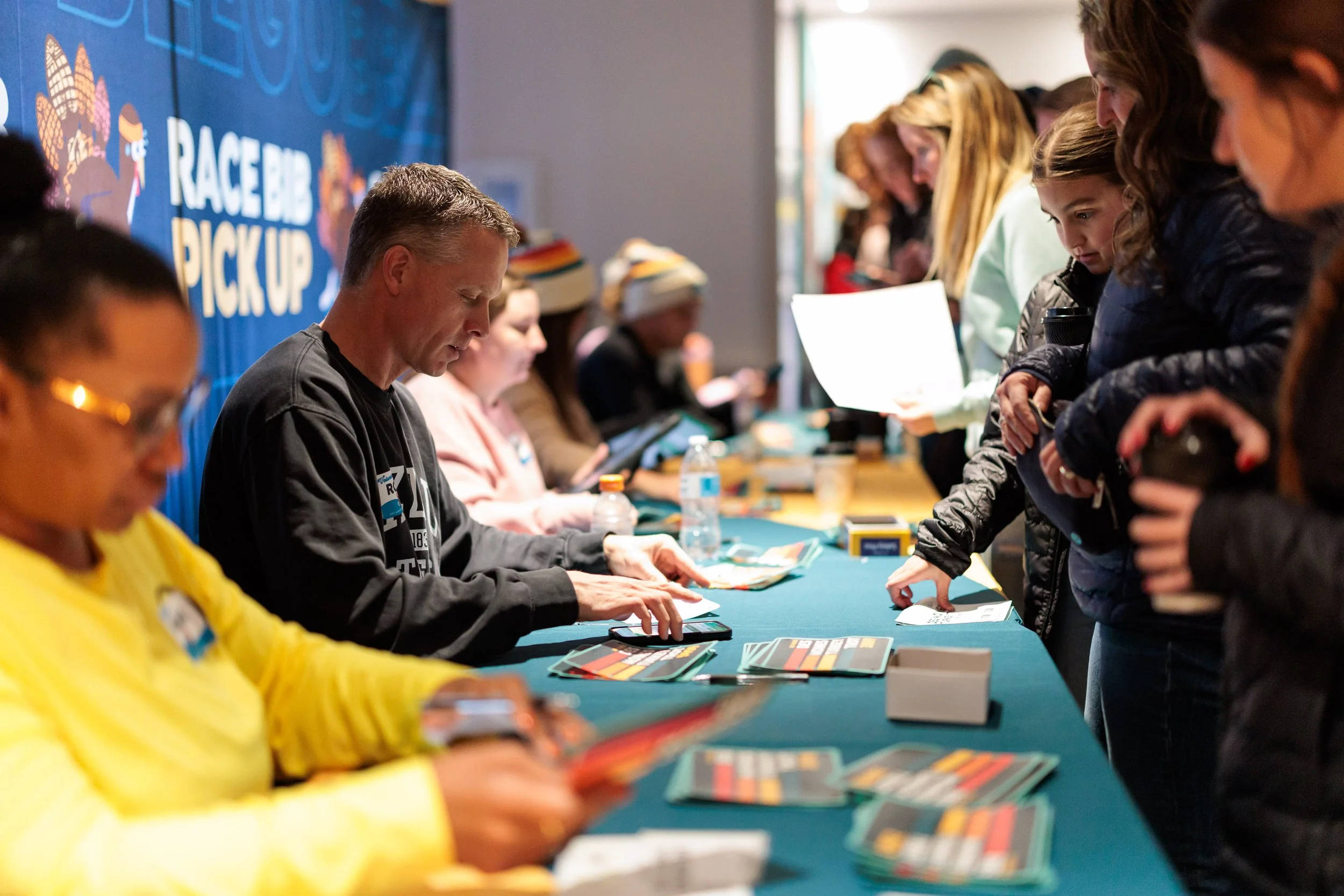
PACKET PICK UP
QUESTIONS
-
Packet pick up will be on the 2nd Floor at Renaissance Savery Des Moines Hotel.
-
As long as that person is registered in our database with a signed digital waiver, then absolutely!
-
Yes, and in fact, you need a signed waiver in order to pick up your packet before running (this includes everyone in your Family of 4.) You can log in to your RunSign Up Profile to sign it electronically (further instructions here) or print a copy to bring with you to packet pick up.
-
Yes!
2025 POST RACE PACKET SHIPPING INFORMATION:
Head to Turkey Trot Athlete Store — Des Moines Turkey Trot and add the Post Trot Swag Shipping to your cart to have it delivered to your door!
If this option does not work for you, please contact info@riproarevents.com to set up a time to pick up your swag at our Downtown Des Moines Office.
THE TROT
QUESTIONS
-
Yep! We're the only Thanksgiving morning race in beautiful downtown Des Moines.
-
3.1 miles or about 6,250 steps.
-
Of course not! There are plenty of other races to test your speed and fitness. This is an event that welcomes runners of all abilities and ages.
-
Absolutely! This event welcomes all abilities, ages, and styles of movement. Walk, trot, jog, or run!
-
We do offer an official finish time that is included in the race fee. You can also choose to forego an official finisher time, we will donate a dollar to one of our partner charities. More information to come at packet pick-up!
-
Your timing chip will be on the back of your bib. You might not even know it’s there. Also, chips are not edible.
-
Yes, there will be one aid station on the 5K course and 2 on the 5 Mile course.
-
Absolutely! Feel free to let out your inner turkey!
-
We were unable to get insurance to cover animals on course and therefore cannot allow dogs, turkeys, or any other animals to run with you. Sorry!
-
Yes (See question below)/Yes/No/NO!
-
Yes! Any participant that is on the race course must be registered and have a signed race waiver. Please register your child for the Tot Trot. The child does not have to participate in the Tot Trot once registered but why not?! A Des Moines knit hat, medal and an untimed bib is included with their registration.
See Tot Trot details below for more information.
-
No. But, please check with your doctor first.
-
FAMILY OF FOUR
QUESTIONS
-
We only have Family Discounts up to 4 people. Please use the largest family discount available and then register other family members separately. Note: if you register to run race week at packet pick-up, family discounts are no longer available.
-
Of course! Ideally, all of your members will need to be in the system/registered before you add them to a group. Follow the steps below :
Click here to get to the Des Moines Turkey Trot registration site.
Click on the Family of 4 Turkey Entry.
If you’ve raced with RipRoar Events before you will want to sign into your Run SignUp profile or click your name in the provided profiles. If you are new, fill in the information for yourself.
After you input your information, choose the event you are registering for (in this case - Family of 4.) Because the 5K + 5 Mile share much of the course this registration applies to both distances and doesn’t need to be decided until you are running!
Next, click ‘+ Add Registrant’ (not continue. From here, enter your second member. Repeat the Step 4 + 5, for members 2-4.
Once you have all information input for each member of your flock then you can click ‘Continue’ to form your group.
TOT TROT
QUESTIONS
-
We recommend this race for any child 8 years and younger.
-
300 meters.
Yes! A parent, guardian or sibling is able to assist the little turkeys from start to finish without being registered themselves. There is no age minimum.
-
Of course! Swag is our middle name. Included with registration is the Des Moines knit cap, official 1 Cute Turkey (untimed) race bib, and the one-and-only medal of the day.
-
The start will AND finish of the Tot Trot will be on 3rd Street in front of the Civic Center. The Tot Trot will start at it’s own arch and finish under the 5K / 5 Mile finish line structure.
GENERAL EVENT
QUESTIONS
-
Yes! We have teamed up with the Renaissance Des Moines Savery Hotel to bring you the best rate in town. (It’s also where packet pick up takes place!)
Room blocks are available now! Book your group rate for Des Moines Turkey Trot! Rooms are available for Monday, November 23rd - Thursday, November 26th.
Last day to book at Group Rate: Monday, October 26th | 2026
-
Yes! Various shifts at Packet Pick-Up and race morning.
Check them out here.
-
Yes! There are multiple parking ramps in Downtown Des Moines that are near the Start, Finish, and post party of the race.
-
The start will AND finish of the Tot Trot will be on 3rd Street in front of the Civic Center. The Tot Trot will start at it’s own arch and finish under the 5K / 5 Mile finish line structure.
RACE WAIVER
HOW TO SIGN YOUR
ALL participants must have a signed race waiver in order to receive their race packet. If a waiver is not signed for a family member of friend that you are picking up for you will need to have them do this in order to take their race packet with you.
CHOOSE AN OPTION BELOW TO SIGN YOUR WAIVER:
OPTION 1: Sign Waiver Electronically before Race Week (recommended)
Sign into your RunSignUp Account
Go to your Profile
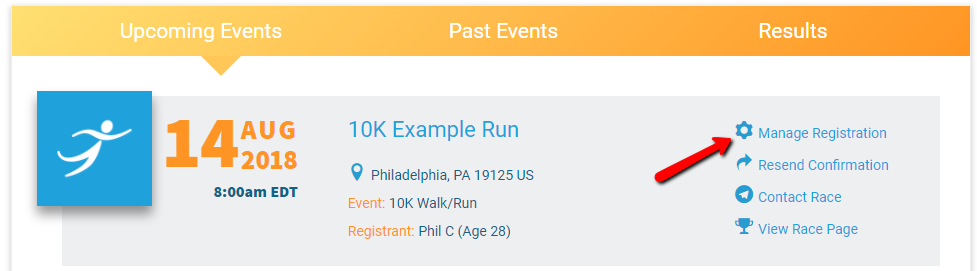
View your events under ‘Upcoming Events’
Click ‘Manage Registration’ next to the registration that you are editing
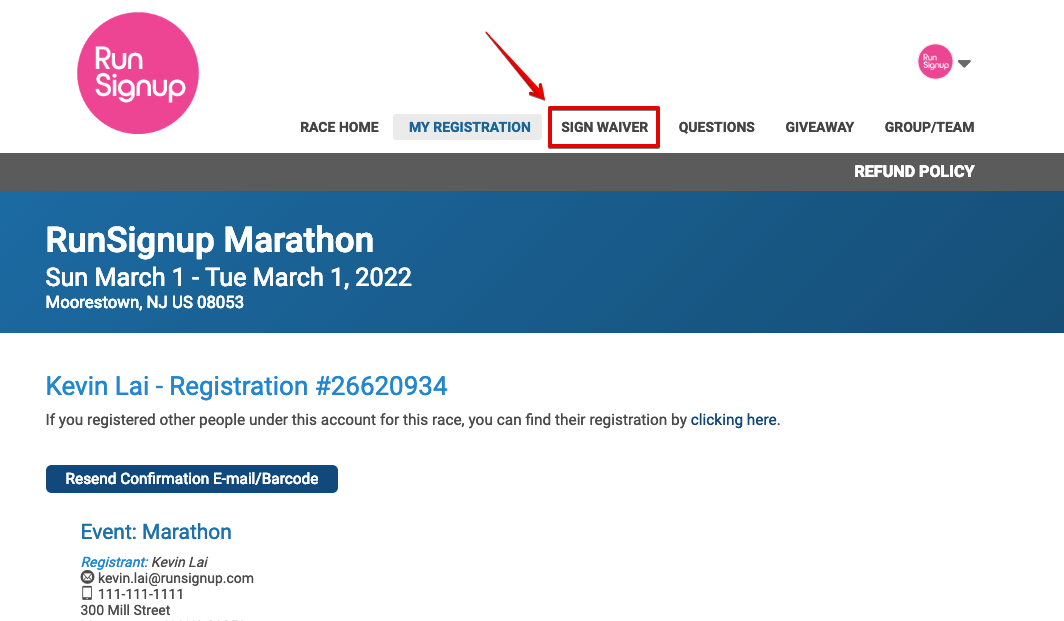
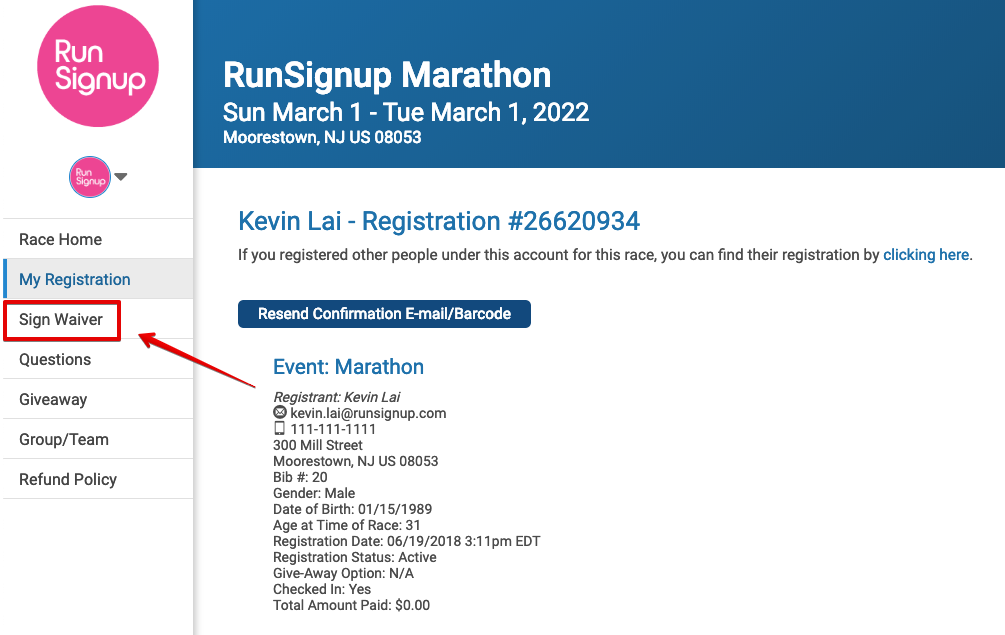
Click on the ‘Sign Waiver’ menu located on either the top OR left side of the Race Page
OPTION 2: Print & Sign Waiver
If you are unable to log into your RunSignUp profile to sign the waiver electronically, please click the button below to download, print and sign. This form MUST be signed and brought to Packet Pick Up in order for a registered athlete to receive an official race packet.